

Showing posts with label Email marketing. Show all posts
Showing posts with label Email marketing. Show all posts
Friday, March 1, 2019
7 Surefire Tips to Increase Email Engagement (And Keep It Going)
It’s the most important moment in your relationship. “Will you subscribe to my email list?” Yes, yes, a million times yes! Congratulations! You did it! Engaged. No no, we meant EMAIL engaged. Actually, I meant email engagement. There are no rings in this case, but be prepared to offer a lifetime of value. You mastered

Thursday, February 28, 2019
Introducing our Subject Line Generator: A free tool to help you write better subject lines
Every interaction with a customer — an email, call, visit to the website, ad, and more — has an impact on their overall experience with your brand. So when you send a message, you’re hoping to influence the each piece of the customer journey. But if they don’t open your message in the first place, 
7 tips for using email to grow your side hustle
Are you ready to take your side hustle to the next level? Email marketing is a powerful and affordable way to expand your customer base, keep customers coming back and grow your side hustle into a full-fledged business. Liberate yourself from the 9-to-5 doldrums and take one step closer to achieving your dreams with these tips for growing your side hustle with email marketing.
1. Create an attractive subscribe incentive
There’s a lot of spam out there, and the last thing anyone wants is to endure another inbox full of stuff they don’t want. That’s why the best way to encourage subscribers is to give them something they do want by creating an attractive opt-in incentive.
Ideas include:
- How-to eBooks and whitepapers
- Instant discount coupons or coupon codes
- Cheat sheets
- Case studies
- Online course access
- Freebies
Think about what drives your audience. What will they find so useful and valuable that they can’t resist subscribing to your email list? Create that, and they’ll be more than happy to opt in.
Of course, you’ll need to make sure your incentive is gated so it can’t be accessed by non-subscribers. An easy way to do that is with email automation that automatically sends the attachment or download link to every new subscriber.

2. Create a value statement
We’ve already covered the opt-in incentive, but you also need to deliver a value statement that creates desire. What benefits will your subscribers receive beyond your initial incentive?
For example, you might promise:
- Useful, free tips delivered to their inboxes daily
- Early access to special VIP discounts and sales
- Unique resources no one else gets
- Engagement with a community of like-minded, passionate people who help one another
It’s also a good idea (and legally sound) to mention that you do not spam and they can unsubscribe at any time — a strategy that lessens the risk of subscribing.
Consider giving your email list a name that implies the benefits of subscribing. For example, “Christie’s Creative Cooking Tips” is more attractive than “Christie’s Email List.”
3. Promote your list like crazy
Once you’ve laid the foundation for your email marketing — that is to say, the reasons people should subscribe and stay subscribed — you should promote it everywhere. After all, no one will subscribe if they don’t know about it!
You can promote your email newsletter via:
- Your website (sign-up forms are perfect and easy to implement)
- Social media such as Facebook, Twitter and Instagram
- Your YouTube channel
- Mobile marketing
- Print marketing (business cards, brochures, etc.)
- Word of mouth
Be sure to mention the initial incentive they’ll receive, plus the ongoing benefits of subscribing to motivate the best subscribe rate. Want more ideas? Check out these 40 easy ways to build your email list.

4. Deliver valuable content
You’ve identified the reasons why people should subscribe; now, you need to follow through by delivering on your promises. When you develop valuable content, you can truly engage your audience, foster long-term customer loyalty and influence sales that help grow your side hustle into a full-time business.
Again, think about your customers. What problems do they have? How can you make their lives easier and better? Now, how can you leverage email marketing to do that?
Email content ideas include:
- How-to tips and advice
- Solving problems and answering common questions
- Introducing new and useful resources
- Delivering news your customers are interested in
- Product comparisons
- Customer spotlights and case studies
- Freebies
As you create your content, strive to make it personal. Find a way to relate to your customers and create a sense of solidarity. Tell your story, speak to your audience and be a part of their shared community. Once you’ve developed compelling content that resonates with your customers, you can then promote offers and products that fuel profits:
- Exclusive discount offers
- Product showcases and catalogs
- Buy-one-get-one deals
- Early bird pricing
Email marketing isn’t just about marketing. Your emails shouldn’t be purely promotional. First, establish value. Then, you can leverage the trust you’ve built into happy customers who are thrilled to make their next purchase.

5. Motivate opens with strong subject lines
People receive 80 to 120 emails per day, so it’s easy to gloss over even the most valuable content if it doesn’t stand out in a sea of spam. That’s why you need compelling subject lines so your emails stand out and get opened.
Strong subject line ideas include:
- Pop culture references
- Hashtags
- Descriptive headlines
- Humor
- Benefit statements
It’s a good idea to A/B test your email subject lines, which means trying two different subject lines on a limited number of subscribers to see which performs best, then using the winning subject line for the rest of your list.

6. Send regularly
It’s no secret that repetition is crucial to marketing success. That’s why you need to email your list regularly to remain relevant and to increase the chances of getting in front of customers when they’re ready to buy.
Some marketers email daily; others, twice each week. Some only email weekly. Of course, you want to avoid being viewed as spam, so a good rule of thumb is to email as often as you have something valuable to share.
That doesn’t mean waiting months between emails. Create an email marketing calendar and stick to it. If you’re struggling to come up with compelling content on a regular basis, check out these 50 unique ideas for your next email.
7. Track your results
The more you know about how your emails perform, the easier it will be to create future emails that yield predictably positive results. At minimum, you should track open rates and clicks for every email you send. It’s also a good idea to cross-reference those email KPIs with website visits, incentive downloads, new leads and, of course, sales.
You can take advantage of advanced email reports to gain even deeper insights into your subscribers’ behavior, including:
- Which devices, email clients and browsers your subscribers use
- Geographic data – where your subscribers live
- Heat maps – where clicks occur in your emails
- Comparisons such as subject line word count vs. open rate and click rates by date and time
These are powerful insights that will help you replicate your best emails time and again.

Armed with these tips, you can create a large list of subscribers who are eager to read your next email and click through to take advantage of your next offer. Get the most out of your email marketing by crafting emails that are attractive, deliverable and comply with CAN-SPAM rules — and your side hustle will be booming in no time.
Join 140,000 small business owners
 Subscribe
© 2019, Brian Morris. All rights reserved.
Email Verification and List Hygiene: Why is it so Important?
Email is a remarkably powerful platform that enables one-on-one communication with the subscribers. It is undergoing constant transformation and the modus operandi that worked a year ago might not be effective today. Internet Service Providers (ISPs) strive to keep out unsolicited emails and spam and have set up alerts on which marketing emails should be delivered to the subscribers. On the other hand, marketers have to be doubly sure that their emails do not land in the spam folder. Hence, marketers have to maintain a clean email list to ensure there is no deliverability issue. If you want your email campaigns to be effective and bring you greater ROI, you must verify your email addresses and establish a good email hygiene.
First of all, let’s understand what email verification is.
Email Verification
It is the process by which you make sure the emails on your list are connected to a user’s inbox. This implies that your messages have a valid destination to reach.
Why is Email Verification and List Hygiene so Crucial?
Having a poor-quality email list can hamper your email reputation. Unless the subscribers receive your email in their inbox, your email strategy will be futile. A bad reputation can deter your engagement with subscribers and affect the conversion rate as well.
As the size of your email list grows, it considerably increases the cost of email marketing. Removal of inactive or invalid email addresses and maintaining email list hygiene can help you cut down on the marketing expenses. Obviously, it makes no sense to pay for emails that are not getting delivered.
What do you mean by a clean email list?
A clean email list refers to a list that has only valid email addresses and subscribers who have engaged with one of your emails within the last six months.
How can a dirty list affect your reputation?
ISPs keep a close eye on email senders who use spam traps to reach the subscribers. These spam traps are, in fact, email addresses owned by ISPs and the blacklist providers in order to check that the email marketers are abiding by the best practices.
Numerous spam traps exist on the Internet like Pristine, Typo Domain Traps, and Recycled to name a few.
- Pristine spam traps include email addresses that did not opt for receiving any email communications. Most likely, the sender acquired the email addresses from a third party or other questionable methods.
- Typo domain traps are email accounts that match the conventional domain names with a minor difference. Gmail becomes gnail, Hotmail becomes hotnail or hotmale. Although this seems quite amusing at first look, it can be a huge setback for your email reputation.
- Recycled spam traps consist of email addresses that were used by an individual in the past, but not used any more. If you are unable to access your email address from your teen life, it is quite likely that it has become a spam trap.
It is important to note that ISPs are continuously monitoring whether the email deserves to land in the subscriber’s inbox. Sending emails that do not get opened indicates that people are not interested in receiving them, as a result of which your emails might get land in the spam folder. Consequently, your email bounce rate will increase and your delivery rate will fall drastically.
Do you know ISPs, spam monitors, and email security services have set thresholds for undelivered messages, unsubscribes, and spam complaints?
In case you cross this number by sending emails to stale lists, your account might get suspended. You could be basking in the glory of sending emails to hundreds of subscribers, but if the email addresses are invalid, it will not only burn a hole in your pocket but also will not lead anywhere. This, ultimately, hinders your email marketing performance as a whole.
How to Maintain a Clean Email List?
- The most obvious tactic to maintaining a healthy email list is implementing email validation during the sign up. Sometimes, subscribers make a mistake in providing their email address. You can prompt them regarding the error in the sign up form.
- With the implementation of anti-spam laws like GDPR, it has become all the more important that you have explicit permission to send marketing emails. We strongly recommend you ask the users whether they want to receive marketing communications. Additionally, you can send a verification email and ask the subscribers to confirm their email address by clicking on the email link.
- If you have users who have not opened an email in the past six months, send a re-engagement email series as a part of the ‘email marketing ritual’. However, if they still do not respond or engage with you, bid a goodbye by removing the email address from your list. This process is known as sunsetting the disengaged users. While this can be quite difficult for marketers, it is in their best interest.
- Use different tools like BriteVerify, DataValidation, eHygienics, FreshAddress, Impressionwise, LeadSpend, StrikeIron, etc. that will mitigate the risk of getting blocked by the ISPs or ESPs. It is worth using these list hygiene services to ensure a good email deliverability rate.
Wrapping Up
The biggest temptation for any email marketing professional is a H U G E email list. However, please understand that quality matters more than quantity. Keep your email list free from invalid addresses and validate the subscribers at regular intervals – That’s the key to a healthy email list and a successful email marketing strategy.
Wednesday, February 27, 2019
Tuesday, February 26, 2019
Why We Bought Herman Miller Aeron Chairs For All Our Employees
We spent one-third of our lives at work. Some of us spend more time in an office chair than a bed.
So today’s topic? Chairs.
They are one of the most overlooked, undervalued elements of a workplace.
Take our startup company for an example. Our first office chairs were a Black Friday deal from Office Max (retail: $119). These chairs were purchased out of necessity (we needed seats for 4 employees), timeliness (Black Friday), and budget (#startuplife).
Our second chairs were the highest rated, most economically priced chairs on Amazon (retail: $85). These task chairs were selected out of necessity (we needed seats for 17 employees), because they were aesthetically pleasing to match our office vibe (all white), and budget (#startuplife).
While these chairs met our aesthetic expectations, they fell well short of fulfilling basic human ergonomic needs.
Which leads us to our recent decision to purchase Herman Miller Aeron chairs (Retail: $1,495) for all of our employees (currently a team of 9).
The reasoning is pretty simple and straightforward. We invest thousands of dollars in top-of-the-line computer equipment. Why not invest thousands of dollars in a piece of furniture that has severe implications on personal health and wellness?

To be clear: there’s a lot of subsequent questions I’ve had to ask myself since this purchase.
1. Purchasing these chairs is our largest one-time expense we’ve had in our business. By no means is buying a $1,500 chair an easy decision. Was it the right one?
2. I’ve conducted hundreds of job interviews. I’ve never been asked what kind of chair we sit in. Will any candidate ever ask that question? (I believe candidates should!)
3. What’s next?
It’s the last question of “what’s next” that induces some feelings of buyer’s remorse. Wellness doesn’t stop with chairs. Sitting on clouds isn’t the end solution. The remorse stems from how much more work we have to do to make our workplace an acceptable setting for health.
Standing desks. Walking meetings. Minimizing sedentary nature. The list goes on beyond chairs.
Chairs are an important workplace element. That’s why we invested in them. But the real reason we made the investment was to commit to creating a healthy workplace.
That’s worth the investment in itself.
Other notes, and FAQs about the journey.
We selected the Herman Miller Aeron chair for a few reasons, without any research into other chairs on the market. Those reasons included:
1. The Aeron chair holds it’s value very well. Check out OfferUp. If we ever decided to go in a different direction, we could recoup a chunk of our investment by reselling them.
2. The Aeron chair is universally known. I’ve never sat in one (none of our employees have…they arrive tomorrow), but yet, the Herman Miller and the Aeron brands are so strong that the majority of us know about the existence of both. It’s America’s best selling chair for a reason.
3. The Aeron is featured in the Museum of Modern Art permanent collection recognize it’s design. That says something. Most office chairs are not on display for their contribution to society.
Office chairs say a lot about a company culture.
More so than I realized. Here’s what I found when I asked several friends and colleagues about the chair they sit in at work…
1. One family member said the chair he sits in at work has a ripped hole in it. Ironically, his company is one of the cheapest, stingiest companies I know of (based on what I’ve heard from my family member). That ripped chair is very symbolic.
2. Some people I spoke to fell in the category of “we went to Office Max, sat in chairs, found a deal, and purchased a few. I have no idea what kind of chair they are.” I find that these company cultures are conscious of budget and value comfort – but don’t obsessively prioritize ergonomics. That’s fine, and that’s the majority of companies out there.
3. Everyone knows someone with a nice chair. When I would ask people what chair they would sit in, they would inevitably bring up someone with nice chairs. “Oh, the architects have sweet chairs.” I find that most of the time, the companies have sweet chairs also have sweet company cultures. At least in the examples presented to me.
A few resources that helped rationalize the investment.
1. The book, “The Office: a facility based on change” – written in 1968 by Robert Propst. The book discusses issues in the workplace in detail. The key realization: the workplace has a short history. It’s up to us to write the next chapter in what the workplace looks like.
2. The article, “Killer Chairs: How Desk Jobs Ruin Your Health” published by the Scientific Journal in 2014. This article helps you realize that there is so much more to workplace wellness than chairs.
3. Goodmans. They’re who we purchased our chairs from. They’re a wealth of knowledge, and have an excellent staff.
The Herman Miller Aeron chairs arrive tomorrow. We still have not sat in one. We shall see how this plays out.
12 Winning Strategies to Boost Your Click-through Rates
You optimize your website…
You A/B test your subject lines…
You spend hours perfecting your sentences….
But you realize that your subscribers are just not clicking through on your emails. Your click-through rate is in a sad, sorry state.
And if subscribers aren’t clicking through on your links, it means that your sales are likely suffering as well.
So how big of an email intervention do your click-through rates actually need?
Well, it depends on your numbers.
Your click-through rate is the percentage of people who clicked on a link in your email from the total number of people that opened it. It reveals how people are responding to the content of your email and if they find your content relevant enough to click-through for more.
Mailchimp’s 2017 benchmarks on email open rates by industry show click-through rates ranging from 1.25% in the restaurant industry to 5.13% in the hobbies sector. HubSpot’s benchmark studies place the median click-through rate at between 6-7% depending on the number of email campaigns sent and size of the company.
Look at the industry averages and compare your numbers with them. If you’re panicking or shaking your head in dismay, you’re not alone.
In a 2015 survey of 300 marketers, Ascend2 found that low email click-through rates were the single biggest challenge email marketers faced.
Every part of your email has a role to play. Your subject line sells the open. But what you do within your email and how you present your link, is what sells the click.
That’s exactly what we’re going to talk about in this post. By the end of this post, you’ll know 12 winning strategies to boost your email click-through rates.
#1 Have one primary call to action
Check this out and then do this and then do that
Ever received an email with several calls to actions?
Don’t have too many calls to action unless your email style is that of a curated newsletter. Because when you do, your most important one gets buried and your subscribers never take action on what you want them to.
Always define the primary purpose of an email before writing a single word.
Once you’ve done this, it’s easier to craft your email such that every single element is designed to lead your subscriber into taking that desired action.
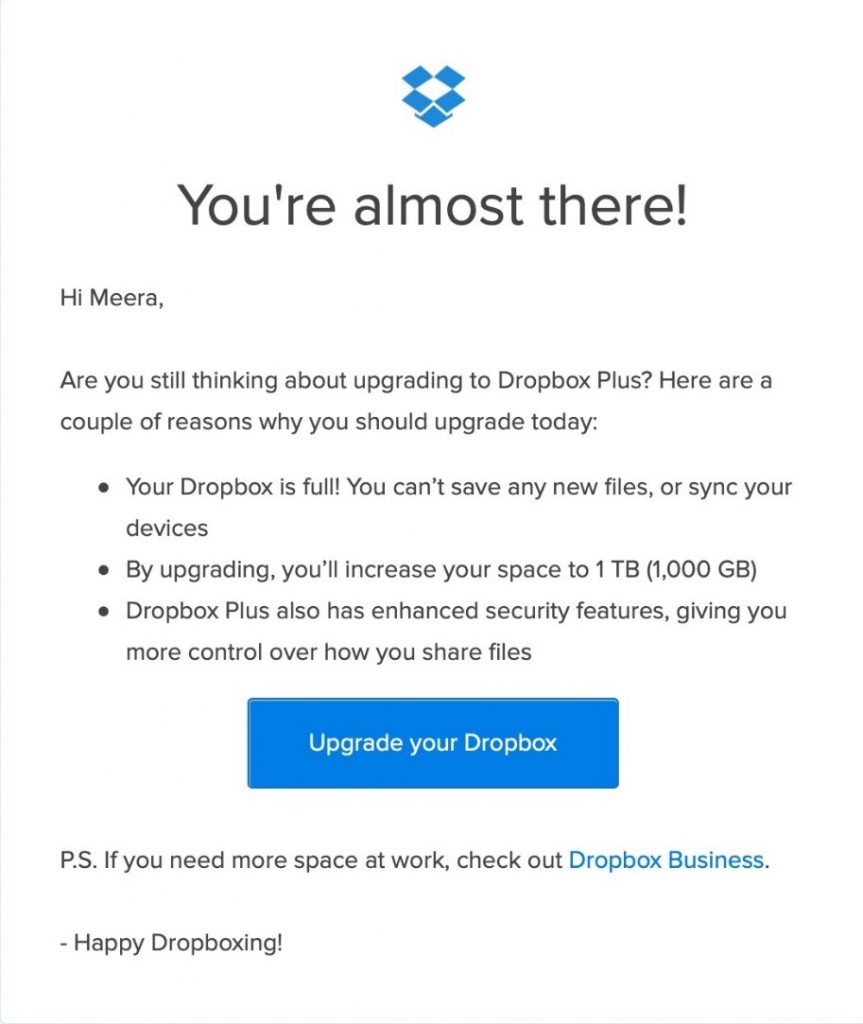
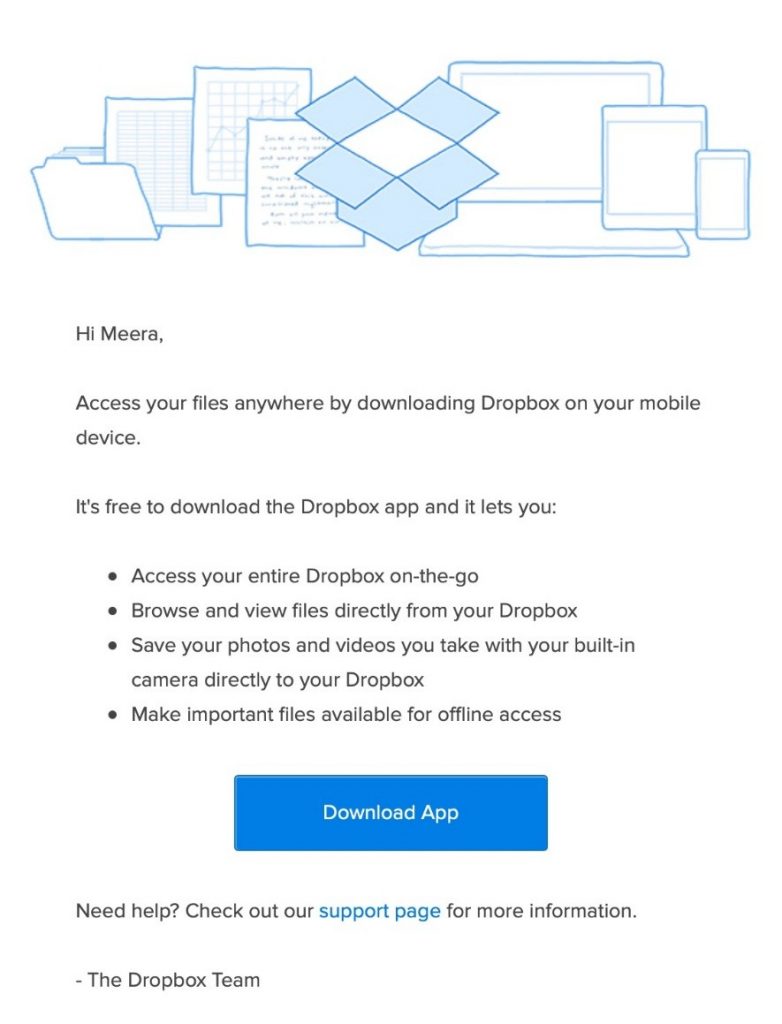
Dropbox does this very well. Every single email they send is based on ONE primary call to action.
#2 Segment your list
Do you send your emails to everyone on your list?
Then it’s about time you stop.
Not every email or offer will be relevant to everyone on your email list. The purpose of segmentation is to avoid list exhaustion where you send too many emails or send emails that are irrelevant to your subscribers.
By segmenting your list, you’re able to tailor your content for different groups of subscribers. You can use what members of a segment have in common to deliver more relevant emails to that segment. You’ll not only enjoy higher click-through rates but sales as well. Research has shown that Marketers experienced a 760% increase in revenue from segmented campaigns.
There are several ways to segment your email list but here are 3 simple ideas on how you can do so.
- Behavior-based on actions taken in emails – You create a segment of subscribers who have clicked on links in emails or a set of links related to a specific topic or clicked to sign up for specific events in an email.
- Entry Point – You create a segment based on what they opted into
- Self-selection – You create a segment based on what your subscribers have indicated as their topics of interest
#3 Clean your list
An email list decays by about 23% every year.
These include people who have stopped opening your emails or includes email inboxes that people have abandoned.
It’s in your best interest to delete these subscribers because:
- The higher the number of inactive subscribers you have, the lower your engagement rates will be. For instance, if 1500 recipients open your emails and you email 10,000 people, your open rate is 15%. If 4000 of those people are inactive and you decide to not email them, your open rate jumps to 25%. The sale goes for your click-through rate. You get a better picture of your stats and what content resonates more with your audience.
- The lower your opens and clicks, the lower your sender score or sender reputation. Each of the email delivery providers gives you a sender score. The lower it is, the higher the chances of your emails being placed in the promotion or junk folder. This even hurts the placement of your email in the inbox of subscribers who may be opening your emails.
How do you clean your list?
Step 1: Identify cold subscribers
Most email service providers help you maintain a cold subscriber list. If yours doesn’t, create a segment of people who haven’t clicked or opened your emails over a 3-6-month period.
Step 2: Run a re-engagement campaign
Tag these subscribers as ‘Cold subscribers’. Remove this segment from any of your ongoing email campaigns. You will immediately see an increase in your open and click-through rates.
Then, craft a series of 2-3 emails letting this segment of subscribers know that they haven’t opened or engaged with your emails and ask if they would still like to be on your list.
Give them the option to stay on your list and to indicate their interest by clicking on a link. Anyone who doesn’t act on that email gets deleted off your list.
It’s not uncommon to have several thousand cold subscribers. Sidekick removed a whopping 38k subscribers who were not engaging with their content.
#4 Include a link more than once
Let’s be honest.
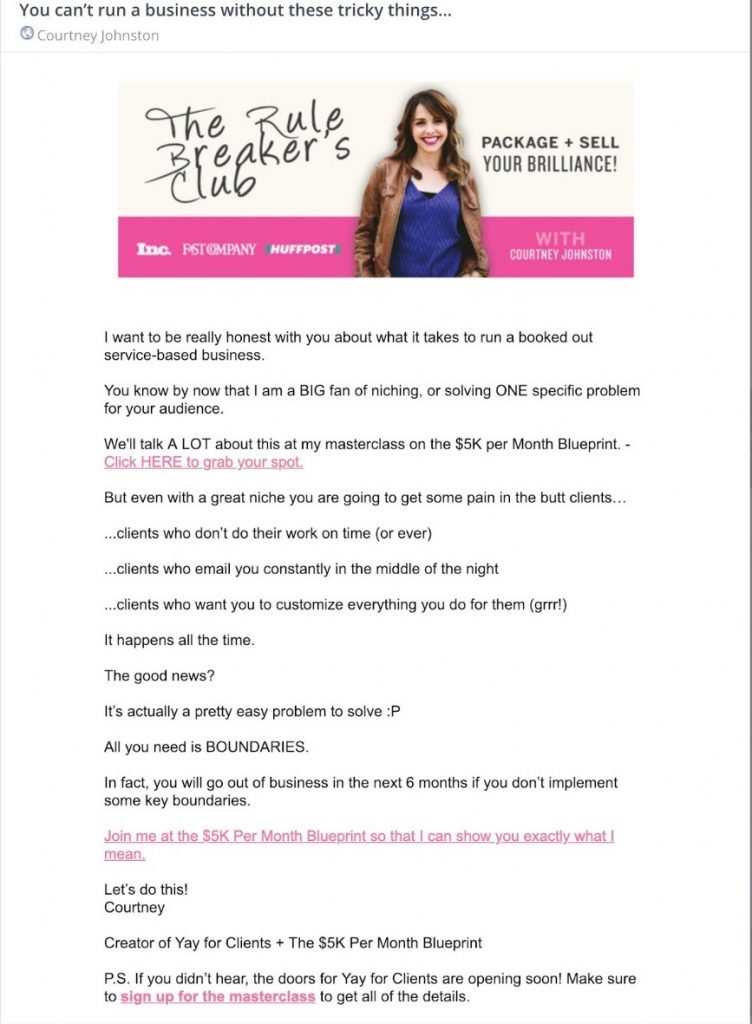
We all skim our emails. That’s one of the reasons you should include more than one link in your emails. Preferably in the top–middle–end–P.S. That’s how many you can include.
An unused P.S, in particular, is wasted email real estate. That’s one of the first places that skimmers look. Look at this email from Courtney Johnston of the Rule Breaker’s Club. She weaves in her link several times in the length of her email.
#5 Prime the click
What’s behind the click?
What transformational piece of information are they going to get?
What offer are they going to uncover?
Is there a compelling reason for them to want to click?
What exactly is the benefit?
Once you know this, it’s easier to improve your call to action phrases – the words you use just before the click- that lead your subscriber to click through.
Here are some ways to do this.
Ask a benefit-driven question
For example,
- If these are the questions on your mind, I help you answer them in the latest post: How to grow your tiny list with 29 simple but powerful tactics. (Click here to read my answer)
- How do you make your freelance design term work harder for you without paying extra dollars? Click here to find out
Show Proof
For example,
- This process increases opens by 3x. See how it works here
- This template cuts my writing time in half. Get it for free here
Make them nod and say yes via a rhetorical question
For example,
Want to grow your list on steroids? Download this template for free
This is your last chance to get [name of offer]. I may never offer this again. Want to get rid of your traffic problems? Sign-up Now
#6 Use Video
According to research by Forrester, when marketers included a video in an email, the click-through rate increased by 200% – 300%.
Not all email clients support the ability to play video right in the inbox though. It’s likely yours doesn’t.
But that doesn’t mean you can’t give the illusion of a video in your subscriber’s inbox.
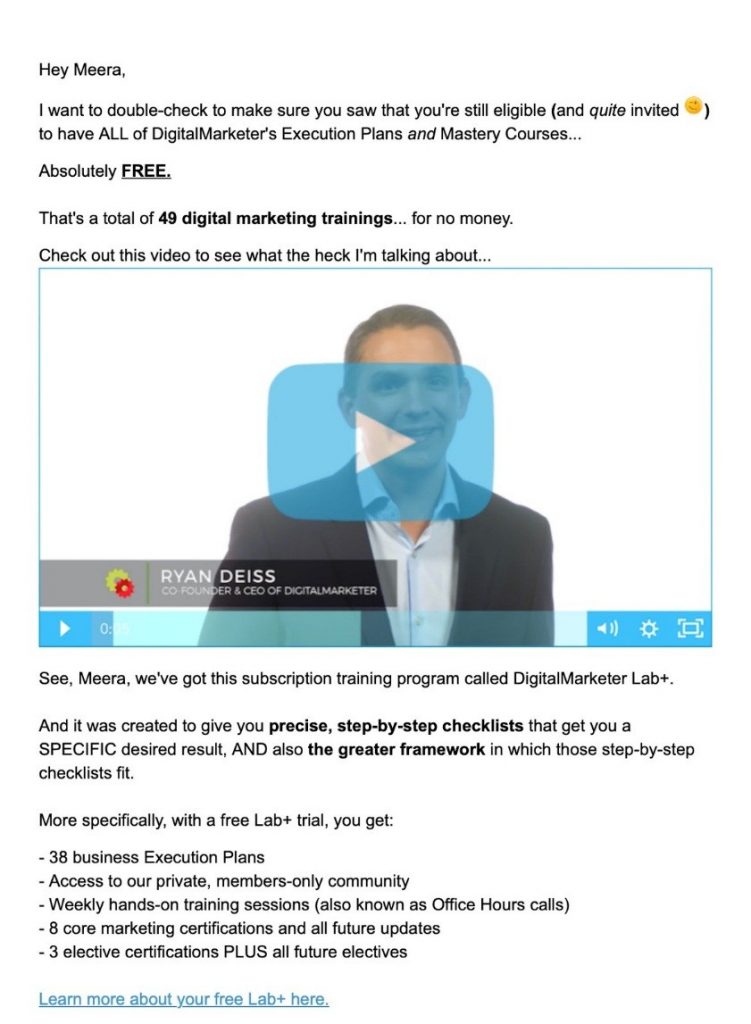
Having a play button on top of a static image is one of the best ways to link to video sales letters or video content hosted on sites like Vimeo and YouTube. See how Digital Marketer does so here.
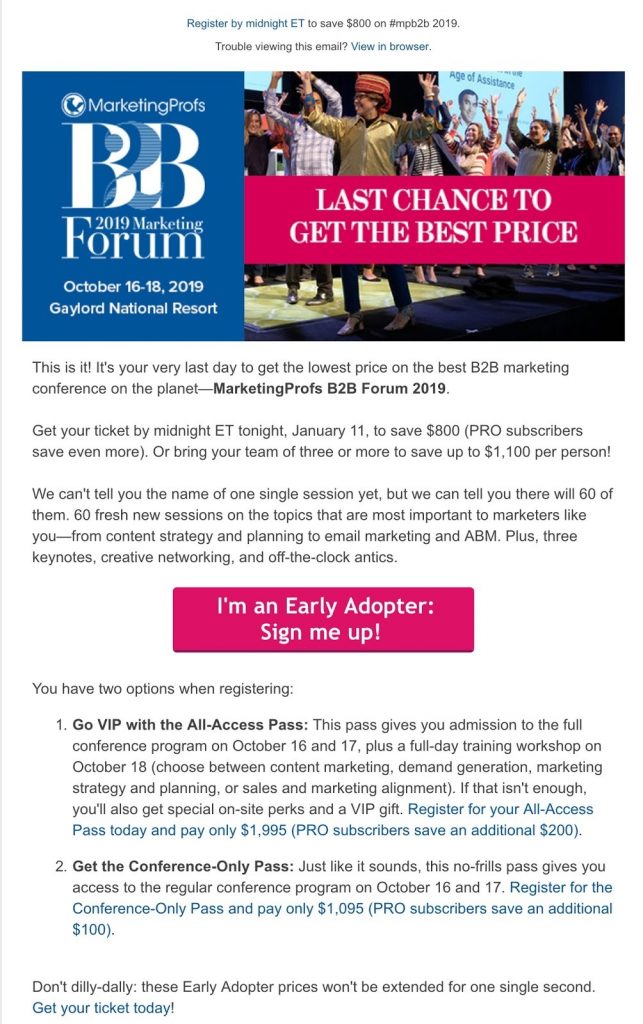
#7 Use Button CTAs
Buttons always prompt readers to click. They stand out as well.
See how MarketingProfs uses a brightly colored button to prompt subscribers to click.
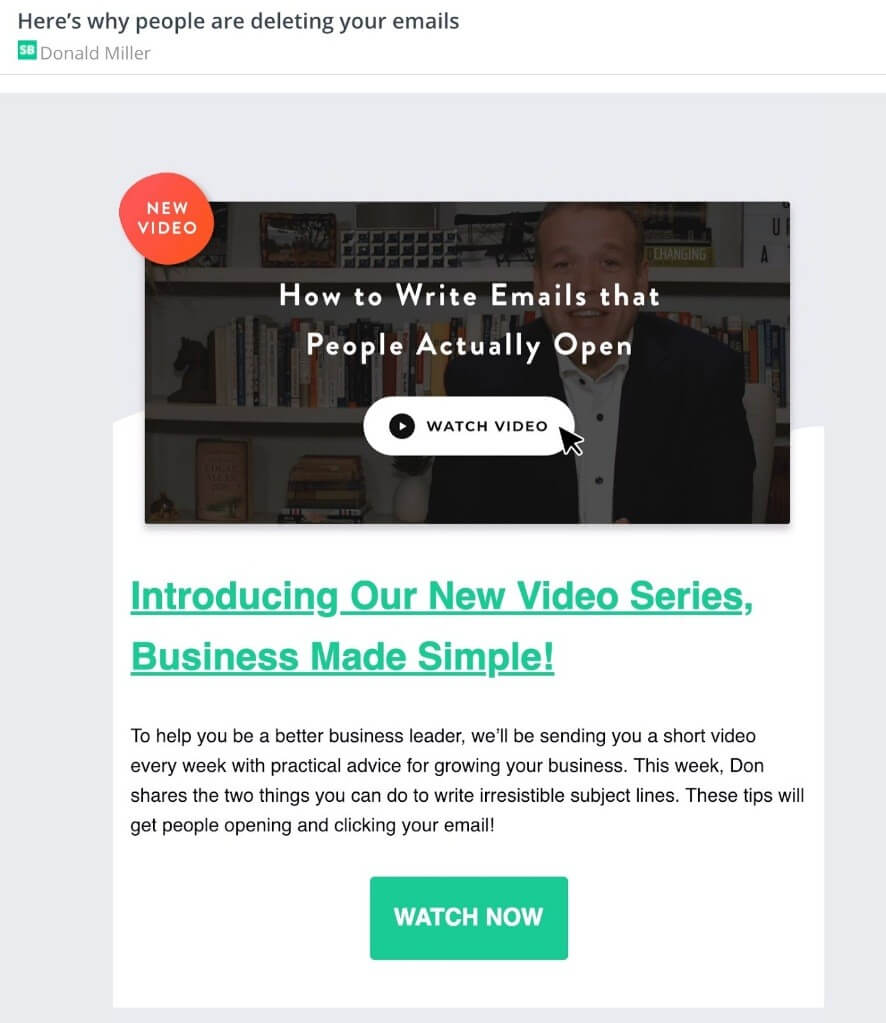
#8 Have an animated GIF
Using an animated GIF on your call-to-action button is another way to draw attention to it and compel subscribers to click. StoryBrand does this really well right at the top of their email.
#9 Use images to boost your click-through rate
Using images strategically can boost your email’s call to action. See how Amy Porterfield does this.
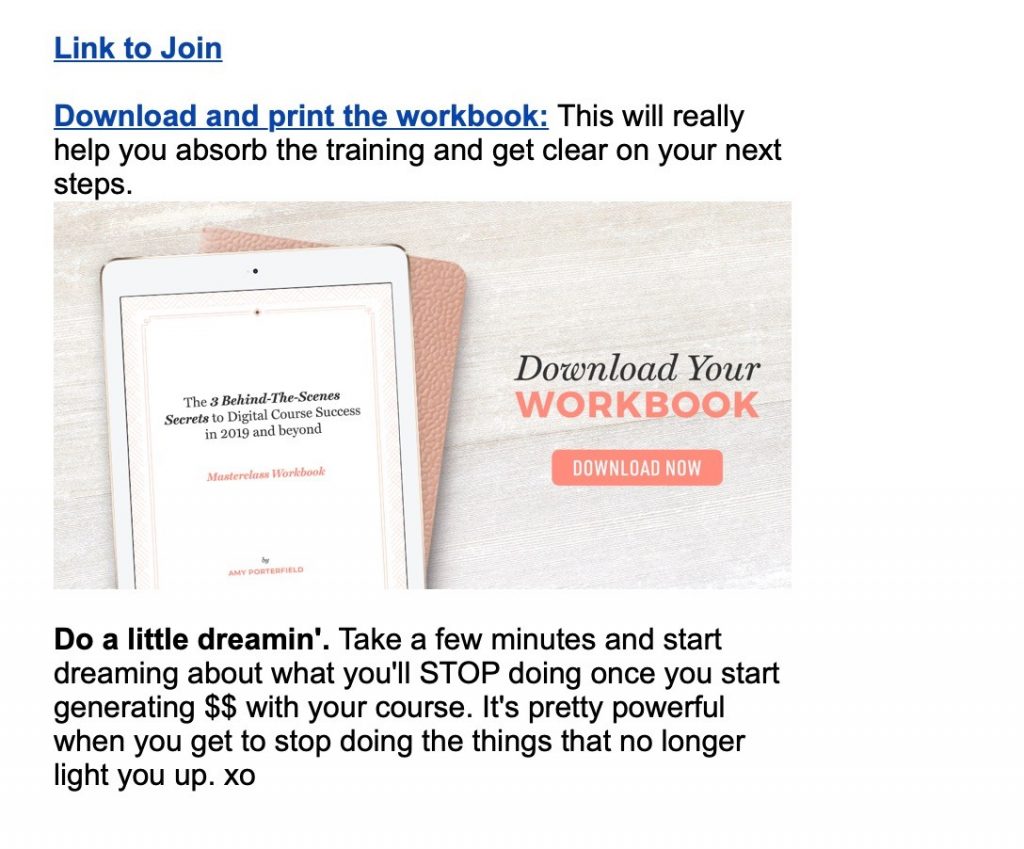
But remember that your plain text email has to make sense even if you remove your image because several email clients block images. One way around this is to use the alt-text – a short description that displays when a subscriber is unable to access an image. Most email marketing services let you easily fill this field for your images.
#10 Use trigger words in your call to action
Utilizing certain keywords in your call to action can trigger higher click rates. For instance, Copyblogger states that these are the 5 most persuasive words:
Free
Bonus
Because
Instantly
New
Keep a list of trigger words in your swipe file and collate them over time by analyzing your email campaign data. Use them in your call to action to enjoy a boost in click-through rates.
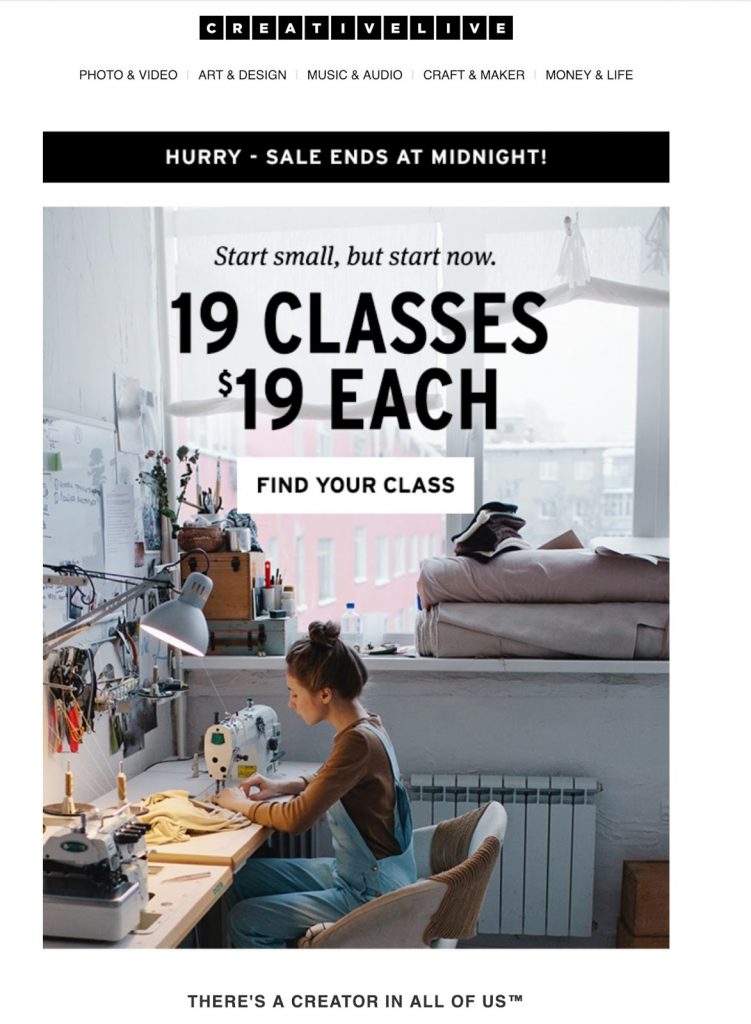
#11 Create Urgency
Subscribers need to clearly know when your offer or sale period ends. Create a sense of urgency so that they are prompted to buy now rather than later by using words such as ‘Hurry! Offer Ends Soon’ or ‘Last Chance’. You can also use a countdown timer in your emails to emphasize urgency. Here’s an example from CreativeLive.
#12 Make sure your emails are mobile optimized
In June 2018, mobile opens accounted for 46% of all email opens. 75% of all Gmail users access their email on mobile devices.
Give your readers a pleasant mobile reading experience. To ensure that your emails render the same way across different email clients and devices, keep your emails simple.
Remove distractions from your email template. Resist the urge to add complicated designs.
Plan your email’s layout well so that the reader is naturally drawn toward your call to action.
How do click-through rates affect your business
Don’t end up paying lip-service to vanity metrics without knowing how they directly affect your business.
Is it ok if subscribers throw heaps of engagement at you but never buy from you at all?
Is it ok if they click-through and never buy? It’s easy to get lulled into a false sense of security but always see the bigger picture and the impact it brings to your business. Remember these 12 tips to boost your click-through rates!
If I Had to Start All Over Again, I Would…

I started young. At the ripe age of 15 and a half, I started my first online business.
Can you guess what it was?
It was a job board. I created it because I couldn’t find a high paying job at that young of an age. Heck, I struggled to find even a low paying job!
As you probably can guess, it failed and, eventually, I went on to do other stuff.
From creating an ad agency to a few software companies… the list goes on and on.
But if I had to start all over again, what do you think I would do?
Well, before I get into that, let’s first talk about what I learned a bit too late…
What I learned too late in my career
I’m really good at one thing and one thing only.
It’s driving traffic to a site.
It doesn’t matter what industry a site is in, I can drive traffic to it and make it popular. And best of all, I can do it without ads.
But because I can do one thing well, it doesn’t mean I can create a successful business. I still need amazing people around me.
For example, when I started working with Mike Kamo, my business started to take off.

He’s the CEO of my ad agency, and typically the CEO of whatever I want to do. And if he doesn’t have the time, he finds someone who does.
See, Mike doesn’t have a college degree and he’s not your typical CEO. But he is really good at building teams and hiring the right people. And best of all, he can do so on a budget.
That is his best skill!
And working with him I realized that no matter how smart you are, you’ll never build a big company unless you have a talented team.
Sure, you can get to millions on your own, but it’s hard to get to 9 figures or even 8 figures a year in revenue without an amazing team.
People help you scale and grow fast. With more brain power, assuming you are picking good people, you’ll solve your problems faster and see revenue roll in.
So what would I do if you started over again?
Well, the lesson above is one of the hardest lessons I had to learn. And I learned it too late in my career.
It’s obvious, but when you start out as an entrepreneur at too young of an age, you make mistakes (sometimes huge ones) that you more likely wouldn’t have made if you had started your entrepreneurial journey a bit later.
So, what would I do?
Well, I would spend the first 9 years of my entrepreneurial journey in the workforce.
The first 3 years I would spend my time at a startup. And ideally, one that doesn’t have too much venture funding and isn’t taking off like a rocket ship.
The reason I wouldn’t pick a fast-growing startup is that the hardest part is making a company work and then growing it. By working at a company that has amazing traction because of timing or luck, or something that they couldn’t control… it teaches you to be creative, scrappy, and how to fight to win.
You’ll learn a lot from the startup life.
After my first 3 years in a startup, I would then spend the next 2 years working at a mid-size startup that has raised at least 10 million dollars and is growing up and to the right like a hockey stick.
This will help you understand what a fast-growing company looks like. And let me be the first to tell you, it’s not sexy… it’s very messy.
So many things go wrong and keep breaking because you are growing so fast. You’ll end up finding things like your economics may not be great, or you may be working with mediocre people because you just need to hire for the sake of filling in empty positions.
And after those 2 years are done, I would spend 2 years working at a mid-sized company. One that generates at least a hundred million a year in revenue, but less than a billion.
The struggles that mid-size companies face are different than startups and large corporations. But by being in the mix at one of these companies for a few years you’ll learn everything from dealing with politics, to how to make a slow-moving company grow, to even thinking about the big picture. Such as how bigger companies look for huge markets because they know that it is easier to own 5% of a multi-billion-dollar industry than it is to own 50% of a multi-million-dollar industry.
Last, but not least, I would spend my last 2 years at a large corporation. When I mean large, I’m talking about a company that is worth over 10 billion dollars and potentially even publicly traded.
What would you do after your 9 years as an employee?
The whole purpose of working for others is to get the right mentors and to learn how the real world works.
Entrepreneurship isn’t as glamorous as most people think. Success isn’t easily achieved and it doesn’t look like what you might think considering what so many “successful” influencers might sell you on social media.
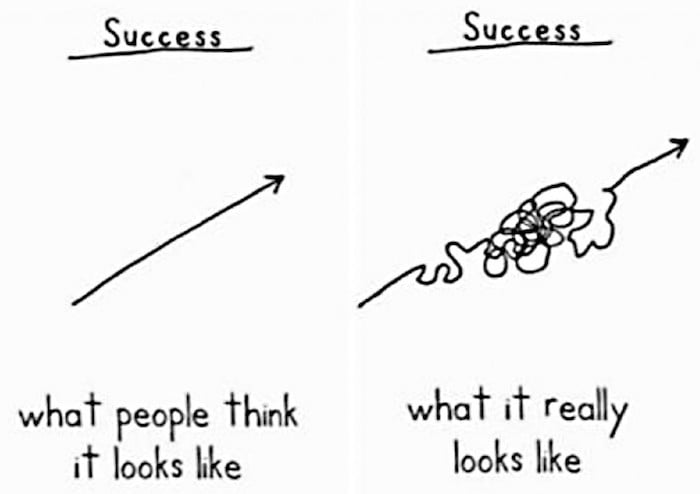
By working with others, you’ll learn what works and, more importantly, what doesn’t work.
No matter how smart you are, you will make mistakes. Just look at people like Elon Musk and Mark Zuckerberg, no one is perfect. Even the billionaires make mistakes.
But once you’ve worked for a handful of companies that are all different sizes, you’ll have a good understanding of what it takes to succeed.
You’ll have a much better understanding of common mistakes people make, such as how to avoid hiring bad people, and if you do hire them, how you need to fire them fast.
In essence, you will have learned what you should do for 9 years straight, which means if you skip all of that, it will be harder for you to be in a position to succeed for lack of experience in the real world. Sure, there is always the possibility of success without all of the experience, but it is much more difficult to become a reality.
Conclusion
Entrepreneurship looks great and is amazing. I wouldn’t trade it for the world. But before you go off and become an entrepreneur, learn from companies of all sizes.
It’s not an easy road and the last thing you want to do is fail on someone else’s dime because your reputation is all you have.
By putting in 9 hard years into other people’s companies, you’ll increase your odds of succeeding.
And when you are ready to go out on your own, hopefully, you would have met a few amazing co-founders along your journey because it takes too much time and capital to do it all by yourself.
So what would you do if you were starting all over again?


Monday, February 25, 2019
The Complete Guide on How to Price Your Online Course for the Greatest Success
So, you’ve made the decision to create an online course or maybe you are thinking about it but not sure how much money you can make with it.. Or maybe you’ve started – or even finished – creating your course already. But, now the question remains: How much are you going to charge? What’s the
The Complete Guide on How to Price Your Online Course for the Greatest Success
So, you’ve made the decision to create an online course or maybe you are thinking about it but not sure how much money you can make with it.. Or maybe you’ve started – or even finished – creating your course already. But, now the question remains: How much are you going to charge? What’s the
How To Make Money Online – Your First $100k From Blogging
Most people, when they try to make money online, overestimate what they can do in one year and underestimate what they can do in ten years.
That is why I often tell brand new bloggers to focus on the first $100 rather than the $100K figure.
That said, how was it possible, that we could create a brand new blog and only 30 days later, have already earned over $5000?
Today’s post will answer that question.
The IncomeDiary Blueprint for Making Money Online
Idea —> Take Action —> Build a Brand —> Create Content —> No Leakage Rule —> Blog Funnel System —> Free eCourse —> Product —> Money
All great websites start with solving a problem.
Step 1) How To Come Up With Website Ideas | Solve a Problem
At IncomeDiary we focus on the make “money online niche”.
Making money online is something that interests a lot of people, from many different demographics.
As soon as we started we had people ask us how to start their first blog.
And once they had started their blog, how could they make money from it?
Some even asked us to build websites for them.
There was a PROBLEM that people wanted help in SOLVING!
From the responses we where getting and our own research it was clear there was a demand.
But how do we make money from this demand?
In the case of IncomeDiary we knew a lot of our income would come from affiliate links.
That is where we started.
If you are a first time blogger you will need a domain, hosting, blog design, email list management.
Fortunately there are plenty of affiliate programs for services like this and in any case we needed all these services ourselves.
As an example if someone signed up for a domain, hosting and a blog design through our affiliate links, we would earn $100.
All we needed to do was convince 50 people to follow our advice and we would earn $5000.
Better still we where recommending products and services that we where using ourselves!
In blogging as in all business having a plan is essential.
A clear vision, backed by definite plans, gives you a tremendous feeling of confidence and personal power ~
All we needed to do now was estimate / work out how much traffic we would need in order to accomplish our goal for month one!
We are simplifying the calculations here a little – not everyone will need a domain or hosting for example – some will purchase more services, some will purchase less.
But for the purpose of planning these where good starting points.
Of course your niche may be entirely different from Make Money Online – but for just about every niche there is be affiliate programs you can promote to your readers.
As an aside, our sister site – ExpertPhotography.com covers a completely different niche to IncomeDiary – but when it started out, it used exactly the same strategy as IncomeDiary to get its first income – great content combined with affiliate income!
Step 2) To Make Money Online – Take Action
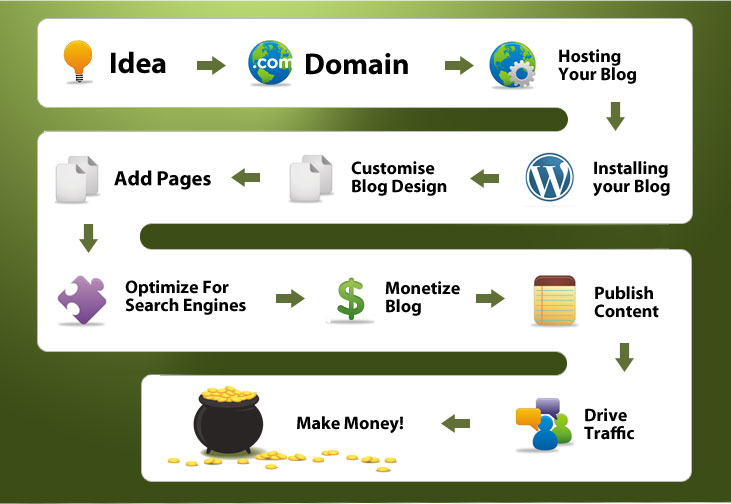
Now that we had an idea, we had to create a website.
This is an easy step, something that only took a few hours. I go over this in detail on this page.
Step 3) To Make Money Online – Build a Brand
Branding isn’t something a lot of people think much of.
But branding is important. It’s what someone thinks about your website.
When people think IncomeDiary, we want them to think, authority website that teaches people how to make money online.
To achieve this, we did a few things:
Domain Name
You want it to be easy to remember, easy to spell and you want it be a .com.
When I create a website, I don’t begin until I have found a domain that I think is good enough.
Sometimes it makes sense to buy a domain that has already been registered from a Domain Broker.
For example, IncomeDiary.com was bought for $100 from a blogger.
And we paid $2000 for our sister site – ExpertPhotography.com – via a domain broker.
Blog Design
If your blog doesn’t look good, it reflects badly on your brand. I’m not saying you have to spend a lot of money, we didn’t.
We started with buying a premium theme for $80 and getting a custom logo created. We kept the website simple and easy to understand.
It’s also important to pick a good color scheme for your site. When someone sees the green color we use, I want them to think IncomeDiary.com (I also wanted them to think money!)
Create Top Lists (read before you scroll past this)
Now I know most people know what a top list is, but you need to know what posts we created, why we created them and how they influenced our brand.
Some examples of the top lists we created:
- 30 Top Earning Blogs
- 30 Top Earning Websites
- 50 Most Influential People in Blogging
- 20 People Who Started As Bloggers, Who Are Now So Much More!
Creating these posts, made us stand out as an authority on the subject.
If we are the website to decide which bloggers are the most influential, then we must know a lot about blogging.
Interview Experts
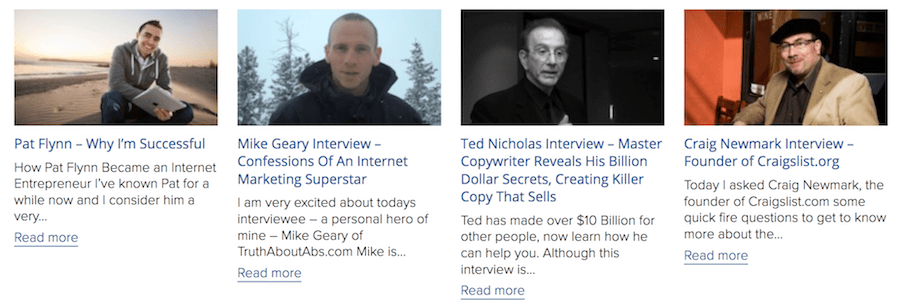
Interviews don’t get us a lot of long term traffic.
What they do though, is associate our website with experts in our industry.
We are not going into detail on conducting interviews in this post – but read any of our interviews and you will have interview templates you can follow.
Step 4) To Make Money Online – Create Compelling Content
To make money, we firstly had to get traffic. To get traffic, we had to firstly create interesting content.
We have spoken a lot about creating content.
The strategy for getting a lot of traffic from blogging is simple – create amazing content.
Look at this post as an example:
- The subject of the post is something people are looking to read about
- Over 2000 words (average page on first page of good is over 2000 words)
- It’s easy to read (checked spelling, grammar, post styling)
- Headline draws the reader in
- It provides real value
- Post images add to value of the post
The 10 posts that received the most traffic in the first few months were all top list articles.
Looking back, their was very little traffic going to any posts that were not top lists or interviews.
One big benefit from writing top list posts and interviewing authorities in your industry, is the amount of links and social media shares you get. Often when we write a post saying that someone is one of the most influential bloggers in the world, they want to link to it on their site, because it helps with their own brand.
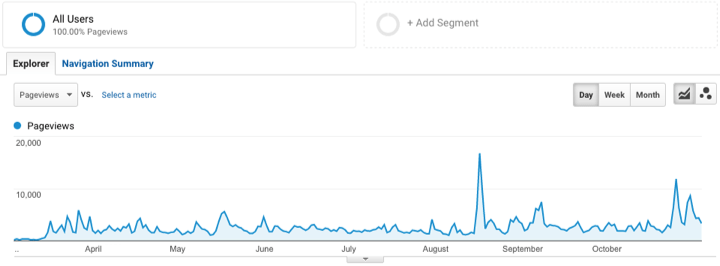
All these links and shares tell Google that we are a great site and they should rank our posts higher in their search engine.
You can see how our traffic would spike every time we published a top list on our site:
Step 5) How To Make Money Online – The No Leakage Rule
The no leakage rule is when you create a website in a way that either a reader signs up for what you are promoting, or they leave your website.
Let me explain further:
The goal of IncomeDiary is to get people to subscribe to our email list. Now to best accomplish this, we need to keep distracts to a minimum.
That means having no banner ads, no blogroll, no top commenters links and so on…
If a website visitor is leaving our website to look at an advertiser, they are not signing up for our email list.
It’s the same reason we don’t want to link to guest bloggers at the bottom of blog posts, because if our visitors are checking out their website, they are not signing up for our list.
Step 6) Make Money Online – Blog Funnel System
This is all about getting your visitors to go where you want them to go, or shall I say, how to funnel them to your desired location.
The goal of our blog is to get people to subscribe to our email list.
That is how we make the majority of our money.
To accomplish this, we get the majority of our subscribers through a popup using OptiMonk. Read this post on: how we use OptiMonk.
The longer someone stays on the site, the more likely they are to subscribe and for us to make money.
Step 7) Make Money Online – Free eCourse
When we started IncomeDiary, not a lot of bloggers were giving incentives for signing up to a mailing list.
Those that did, often gave free eBooks.
I liked the idea of a free eBook but there was one problem.
I wanted readers to take action and if they received to much information all at once, they would feel overwhelmed and would be less likely to follow my guide.
So instead, we decided to split up what we wanted to teach and give it to subscribers over 7 days.
We called it: 7 Day Free eCourse To Creating Your First Profitable Blog
I would explain to everyone signing up that “You may have to spend some money if you want to make some money” – not a lot of money just a little if you really wanted to be serious about blogging. (Less than $100). I included special offers on domain names and offers on hosting such as get your first months hosting for 1 cent and coupon codes. (People love coupon codes)
This worked amazingly well.
Pretty much one of the reasons it worked so well was because I showed my readers exactly what I’m doing. I was not asking them to do anything that I had not done myself.
It’s also important to point out that I was solving a specific problem. I wasn’t simply trying to help people become better bloggers.
Setting up a Autoresponder
Once people opted in and joined my eCourse, the auto-responder would start sending them an email every day for a week.
The course was very much step by step – “Day One, installing your blog” – “Day Two, adding a theme and customizing your blog,” – Day Three: monetizing” etc
Every day subscribers would look forward to the next addition. Often I would get people email me saying, “Hey, is there any chance I can get Day Two now, rather than wait until tomorrow?”
Subscribers took action straightaway. I told them, “Look, take action on this today, and then you’ll be ready to do tomorrow’s assignment.”
Marketing Your eCourse
Another huge benefit of having a squeeze page, or a separate page on WordPress dedicated to your free course, is people have a link they can share with friends if they wish to recommend it. It is great when people Tweet things like “Check Out IncomeDiary’s Free Blogging eCourse” and link to this page.
This also meant I could mentioned this page in my blog posts – for example if I did a Top 30 Bloggers list I would finish it with a link says: “Follow in their footsteps, check out my free course”.
The signup page became so popular that it was the third most visited page on the site.
Step 8) Make Money Online – Selling Your Own Product
Once someone has gone through our eCourse, we want them to be thinking, WOW, that was amazing, I can’t believe that was free.
If they think this, then when we tell them that we have a paid membership site, they can only imagine how good it must be.
When creating products to sell on IncomeDiary, we think about what our readers most want.
The two biggest struggles of new bloggers is getting traffic and making money.
For us, getting traffic has always been easy. And if it’s easy for us, surely we can make it easy for our readers. So we created an eBook called Traffic Domination which is a blueprint to getting over 100,000 visitors a month from top list articles.
We also use to offer a training program called Site Profit Domination which showed our customers in detail how we were monetizing our blogs.
Step 9) Making Money Online and Reinvesting
The reason for a lot of our success is the way we reacted to making money.
When we make money, we reinvested it. We may have started our blog with a small budget but as soon as we had the money, we made it a lot better.
I was not entirely happy with the blog theme, so I spent sometime customizing the design. This included a big change to the homepage – allowing us to display a large opt-in box.
We also used some custom graphics on the side-bar to direct visitors to our best revenue producing pages.
We even bought advertising for IncomeDiary, which at the time, was not something we would normally recommend with a new blog, but earnings per visitor was so good, we could afford to buy traffic.
One final note on making money online.
I love this quote from Paulo Coelho …
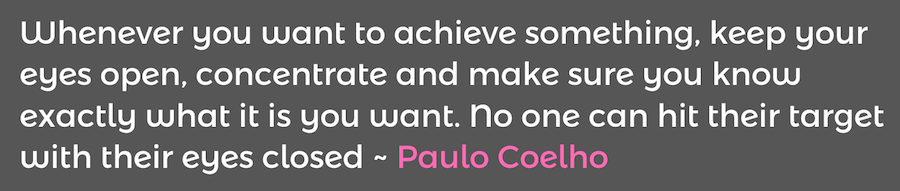
It is essential to know your visitor numbers and your earnings per visitor!
For some, attracting the first 1000 visitors will be the big goal and for others it will be attracting the first 1,000,000 visitors
Set yourself high, but realistic targets and go all out to achieve.
Hoping and Guessing is not a business strategy – but FOCUS and CONCENTRATION is.
What you focus on, EXPANDS!
Take the time to build your brand, build your following and build your website into the premier site in its niche.
Making $100,000 PA is a Big Goal – but it is not an impossible goal.
Believe in you – believe you can do it.
It is also the strategy you need in order to set yourself for the ULTIMATE Pay Day!
That magically day when you eventually sell your business.
Good Luck!
Bring Your Digital Strategy In-Store With ActiveCampaign and Managed Wi-Fi Marketing
This is a contributed post by DragNFly Wireless, an ActiveCampaign Certified Consultant. It’s the end of the night, and you’re looking towards the door when you see the fishbowl full of business cards that need to be entered in your mailing list. Wouldn’t it be a dream if every guest that wanted to sign up 
Friday, February 22, 2019
It’s not you, it’s Outlook: The complete guide for email marketers
Nearly every email marketer has been there: your emails display beautifully on your iPhone, Android device or Gmail, but blow up when opened in Outlook. How frustrating to invest considerable energy into crafting an amazing email campaign, only to be flooded with messages such as “links not working” and “can’t see images” instead of an inbox full of orders!
Installed on millions of devices worldwide, Microsoft’s enduring email client has been a thorn in the sides of marketers and designers for more than two decades – and its contemporary counterpart Windows Mail isn’t much better. Both render HTML using Microsoft Word (though some older versions of Outlook use Internet Explorer), and both ignore code conventions that work perfectly in other email clients.
We’ve been there, we’ve learned how to tame the beast that is Outlook, and we’re here to help. The following lists some of the most common problems with Outlook and how you can solve them.
NOTE: This article is for intermediate to advanced coders who can write and read HTML without a graphic interface. If you’re not a coding maven – and you don’t want to pay one – you can take the easy route with a suite of tools from VerticalResponse. In addition to our popular email builder, we also offer the Email Test Kit, which shows you exactly what your emails will look like in nearly 60 different apps, browsers and devices before you hit “send.” That way you know your emails will display perfectly on all platforms and devices, including Outlook. You can also use our Advanced Reporting tool to gain insights into customer behavior, including which devices and browsers they use so you can be sure to design emails that properly render on those platforms.

Common Outlook problems solved
Here’s how to solve some of the most common email rendering issues in Outlook.
Background images do not display
Outlook will not display background images applied with traditional HTML. If you use a repeating background image, keep it monochromatic and apply a background color as a backup. Alternatively, you can use Vector Markup Language (VML) to force background images to display in Outlook.

Links display in the wrong colors
Outlook automatically makes all links blue (or purple, if they’ve been clicked), which might clash with your intended email design. Solve this problem by defining your link font color in-line.
Images do not display correctly
You can’t control whether a recipient blocks or allows email images automatically, but you can ensure your images are as effective as possible – even if they do not display. Be sure to add descriptive alt text to all images. Alt text renders even if images do not and tells people what your images are about. It can serve as calls to action that motivate clicks and even create desire that influences recipients to allow your images.
You should also account for retina displays by using images twice the intended dimensions. This will help avoid scaling issues that can cause your images to appear grainy.

The wrong fonts are displayed
Outlook will only display fonts installed on a user’s computer, so it’s best to stick to universal fonts such as Arial, Times, Helvetica, Verdana and Trebuchet. If you do want to use unique fonts, be sure to specify a fallback font that still works with your design.
Links aren’t working or displaying correctly
When you create links, be sure to use the full URL – including http:// or https:// – to ensure they work and display correctly in Outlook.
Animated GIFs do not work
Animated GIFs freeze on the first frame in Outlook. Unfortunately, there’s not much you can do about it, so if your audience is comprised of Outlook users it’s best to avoid using them. Note that modern versions of Windows Mail do support animated GIFs.
CSS does not render correctly
Like many email clients, Outlook struggles to render CSS coded within the <head> tag. Solve this by styling your HTML elements in-line.
Rounded corner buttons won’t display correctly
CSS can be used to display buttons with rounded corners via the border-radius property; however, Outlook does not recognize this property and will display rounded buttons as square buttons. Unfortunately, this is a limitation with no current solution.

Table padding issues
Padding-top will be applied to all <td> tags in a row, even if you only add padding to one <td>. The simplest fix is to avoid using top padding on a row and instead add margins to elements contained within table cells to control spacing. Be sure to write the margin shorthand (margin: 0 0 0 0) rather than longhand (margin-top: 0px); otherwise, you risk encountering other bugs. Another, less elegant solution is to add a one-cell nested table, then add padding-top to that.
The 1,800-pixel bug
Long emails such as newsletters can break at around 1,800 pixels in length. This is an Outlook error or bug that stems directly from its use of Microsoft Word as an HTML rendering engine: long emails are treated as multi-page Word documents and Outlook is attempting to add a page break. The fix? Keep your emails under 1,800 pixels long.
The layout is out of whack
If you created your email using divs with CSS properties such as float and position, you’ll likely find that your layout is completely off in Outlook. That’s because Outlook does not recognize those properties, so it’s best to use tables to compose your layout.
Table cell bug
For table cells with images shorter than 12px, be sure to apply height to them or face Outlook’s wrath. You should be specifying table height anyway.
Table strokes do not display correctly
If you add a stroke to a table that contains other elements, Outlook can add extra space/padding. Avoid using strokes if possible.
Line height disparities
Outlook can have issues with line height, especially if you specify line heights using a number such as 1.3 or if you set a line height less than one, in which case Outlook will crop your typography in odd ways. Reference this guide to avoid line height issues.
How to design emails for all platforms
Solving Outlook problems can be a headache even for seasoned coders. Not only do you need to address Outlook’s issues, but you also need to be sure any changes you make do not negatively affect how your emails render in other popular email clients such as Gmail, Apple Mail and Yahoo.
The good news is you can avoid the headaches and quickly design emails that work on all platforms with the Email Test Kit. Simply create a new email in the Vertical Response email builder and click “Run Test” to check the following for nearly 60 different email platforms:
- Inbox previews
- Subject line previews
- Links
If you discover an issue, you can make a change without ever leaving the email editor – and confidently send emails knowing they’ll display perfectly on all platforms and devices.

You can also save time with VerticalResponse’s Advanced Reporting tools, which show you which browsers and devices clients your customers use so you can ensure your emails render perfectly on those platforms.
With tools like these, what was once an extremely frustrating aspect of email marketing has become quick and simple. If you don’t want to hassle with tedious testing and jumping back-and-forth between your HTML editor and various email clients, you can save time, money and headaches by creating and testing your emails with VerticalResponse.
Build, send and track emails that look great on any device
Editor’s note: This guide was originally published in 2012 and has been updated and revised for accuracy and relevance.
© 2019, Brian Morris. All rights reserved.
Thursday, February 21, 2019
The Ultimate Guide of Instagram Hashtags For Photographers
You’ve spent long nights editing in LightRoom and you’re finally ready for your content to be discovered. Instagram is a marketing gold mine for businesses and it’s an opportunity that many photographers are taking advantage of. In order for your content to be discovered by your target audience, the use of hashtags is a must. Ready to dive into the world of Instagram hashtags for photographers? Let’s get started!
How do hashtags work?
Picture this: you walk into a library looking for a romance book. What would happen if the books weren’t organized by genre? It would be extremely difficult—and exhausting—to find all the romance book options the library has to offer. Libraries organize books by genre to make your search easier, helping you find the type of book you’re interested in.
Similarly, Instagram organizes content by grouping hashtags into categories to facilitate content discovery. When you use hashtags, you’re instantly exposing your content to new audiences that might be interested in the content you’re sharing!
How can hashtags help your photography business?

Let’s say you’re a wedding photographer targeting engaged couples. You share a post using the hashtag #weddingphotographer. Engaged couples looking to hire a wedding photographer might search for this hashtag and discover your content. Because of this, it’s also important to use location hashtags to target people in your area.
For example, if you’re a wedding photographer in Arizona, some ideal hashtags to include are: #azweddingphotographer, #azweddingphotographers, #arizonaweddingphotographer, etc.
Other important hashtags to include are the ones related to your photography style or the type of work you do: #azluxurywedding, #destinationphotographer, #intimateweddingphotographer, #destinationweddingphotographers, #wanderingwedding, #bohowedding, etc.
There’s a limit of 30 hashtags per post, but it’s important to choose wisely. Keep in mind that it’s all about finding not only the best Instagram hashtags for photographers but also the best hashtags for YOUR business!
General Hashtag Tips
Hashtags are pretty simple, but there are a few tips that will make your hashtag search and use easier:
- Focus on Instagram hashtags for photographers with under 500,000 posts. If you use a hashtag with over a million posts, the chances of your post getting discovered are pretty low, and these hashtags are also targeted by bots. The goal is to remain in a hashtag feed as long as possible to reach a targeted—and real—audience.
- Use a variety of hashtag types and sizes to cover locals as well as to maximize your reach. Targeting shouldn’t be too vague, but it shouldn’t be too specific either. Although it’s best to focus on niche hashtags, experimenting with bigger hashtags can increase the chances of your content getting discovered as long as the hashtag is relevant to your post. If the hashtag is relevant, you will receive quality engagement in return!
- Get some inspiration by checking out other photographers with a strong engagement on Instagram. What hashtags are they using? Do they apply to your audience?
- When it comes to finding new hashtags, Instagram autocomplete search is your best friend! Start by typing the keyword you wish to explore and Instagram will take care of the rest.
- Once you find a strong and good-size hashtag, scroll on the hashtag feed to make sure it’s relevant and appropriate content.
- There’s a limit of 30 hashtags per post and a limit of 10 for stories, but the recommended amount is 11 per post and 5 for stories.
- Don’t use the same set of Instagram hashtags for photographers on every post. It’s recommended to change it up in order to prevent a shadowban.
- Don’t make up your own hashtags, unless it’s for branding purposes. If you make up your own hashtag such as #bestphotographerinarizona, you might be the only person seeing that content.
- Remember to set your profile to public! If your profile is private, your posts will only be seen by your current followers, even if you use hashtags.
Now that we’ve reviewed the main hashtag do’s and don’ts, let’s dive into the ultimate guide of Instagram hashtags for photographers!
Instagram Hashtags For Photographers
Architectural
#architecturalphotography #archi #architecture #architecturelovers #archilovers #architektur #architecturaldesign #architecturedesign #archdesign #architectural #architectureporn #architexture #architecturephoto #archilife #archigram #archidesign #archilover #architecturelover
Black And White
#blackandwhitephotography #blackandwhiteportrait #blackandwhite_photos #blackandwhite_photography #blackandwhitephotographylovers #blackandwhitephoto #blackandwhitephotographyoftheday #blackandwhiteisworththefight #blackandwhitephotographer #blackandwhitephotograph #bnw_shot #bnw_planet #bnw_planet_2019 #bnw_diamond #bwstylesgf #bnw_one #bnw_world #bnw_lovers #bnw_color #bw_divine #amateurs_bnw #top_bnw #bnw_of_our_world #bnw_life_shots #bnw_minimal #bnw_sniper #bnw_shot
Equipment (Type of Camera)
#vsco #canon_photos #nikonnofilter #vscofilter #vscoedit #vscocam #canonphotography #canon80d #canon80d #canon6d #canon6dmarkii #canont6 #canonrebelt6 #canon5dmarkiv #canon650d #canon_photos #canon550d #canon_camera #canonusa #nikon #nikond750 #nikond3400 #nikond5600 #nikonphotography #nikonphoto #nikon_photo #nikonistas #canoneos #canonrebel #canonphotos #teamnikon #teamcanon
Events
#eventphotography #eventphotographer #djphotography #concertphotography #concertphotographer #musicphotography #livephotography #stagephotography #concertphoto #livephotography #livemusicphotography #bandphotographer #concertphotos #liveconcertphotography #festivalphotography #festivalphotographer
Family/Maternity/Kids
#pixel_kids #lookslikefilmkids #magicofchildhood #clickinmoms #dearphotographer #galleryoflightfeature #cameramama #dearestviewfinder #thesincerestoryteller #candidchildhood #momtogs #jj_its_kids #shared_joy #childhoodpure #hellostoryteller #theeverydayportrait #dpmagfaves #cpcfeature #documentyourdays #pixel_kids #childrenseemagic #purelyauthenticchildhood #stunningbabies #atdiff_kids #letthembelittle
#maternityphotography #maternityshoot #pregnancyphotoshoot #pregnancyphoto #pregnancyphotos #pregnancyshoot
Fashion & Models
#fashionphotography #fashionphotographychannel #fashionphotographyoftheday #fashionphotographyeditorial #fashionphotographyappreciation #fashionphoto #fashionphotoshoot #fashionphotographer #fashionphotograph #profile_vision #editorialphotography #editorialshoot #editorialstyle #editorialwork #editorialbeauty #beautyshoot #ftmedd #bravogreatphoto #bleachmyfilm #musephoto #humansmagazine #featuremeseas
Food
#foodphotography #foodphotographyprops #foodphotographyandstyling #flatlaystyle #flatlays #flatlayoftheday #vzcomade #food_vsco #foodblogfeed #foodie #foodiesofinstagram #foodies #foodie_features #foodiefeature #foodfluffer #feedfeed #healthyish #theeverygirlcooks #tablesituation #eatcolorful #savorthejourney #gatherandfeast #mycommontable #myopenkitchen #heresmyfood
Lifestyle
#lifestylefamilyphotography #lifestylephotographer #lifestyleportraits #lifestylephoto #lifestyleblogger #lifestylephotography#lifestyleshoot #lifestylesession #lifestyleinspo #lifestyleblog #lifestylebloggers #lifestyleblogs #lifestylephotos
Nature
#naturephotography #naturephotograph #naturephotographer #naturephotographers #earthpix #earthofficial #visualsoflife #nightimages #camp4pix #theearthoutdoors #folkmagazine #wildernessculture #natgeo #earthpics #discoverearth #naturephotographs #nakedplanet #naturephotographyday #naturephotographylover #ourplanetdaily #naturephotographychallenge #awesome_earthpix #nature_wizards #naturephoto #theworldshotz #arthfocus #earthfocus
Photography- General
#fotograf #thevisualcollective #watchthisinstagood #feedbacknation #artofvisuals #alphacollective #agameoftones #folkscenery #awesome_photographers #complexphotos #lensbible #justgoshoot #photographysouls #flashesofdelight #featurepalette #peoplescreative #photographylovers #shootandshare #bloggerphotographer #lookslikefilm #nothingisordinary_ #stunning_shots #clickpro #wanderinginfilm #moodygrams #creativesontherise #photographie #fromabove #gramslayers #artofvisuals #fatalframes
Portrait
#portraitphotography #pursuitofportraits #postthepeople #discoverportrait #thebloomforum #portraitmood #lifestylephotography #portraitcentral #quietthechaos #featuremeofh #makeportraits #portraits_mf #theportraitpr0ject #kdpeoplegallery
Sports
#sportsphotography #sportsphoto #baseballphotography #canonsports #sportphoto #basketballphotography #soccerphotography #tennisphotography #baseballphotography #sportphotographer #vscosport #sportpic #canonsportsphotography #sportsshooter #handballworld #handballphoto #actionshot #gettysport
Travel
#voyaged #createexplore #exploretocreate #exploretheglobe #stayandwander #theglobewanderer #natgeotravel #globe_travel #roamtheplanet #tlpicks #exploremore #adventurephotography #wanderingphotographers #travelphotography #travelphoto #travelstoke #discoverearth #travelphotographyoftheday #travelblogging #borntotravel #travelworld #worldtravelpics #mytravelgram #traveladdicts #globetrotting #optoutside #roamearth #traveltheglobe #worldshotz #getlost #shesnotlost #travelcaptures #roamnation #travelpassion #instapassport #passportlife #travelblog #travelblogger #travelblogging #travelbloggers #travelblogs #instatraveling #instatravelingram #igtravel #travelingram
Wedding/Bridal
#bridalinspiration #bridalshoot #styledweddingshoot #weddingstyle #engagementphotos #photobugcommunity #engagementphotographer #ocphotographer #adventurebrides #adventurewedding #wanderingweddings #authenticlovestories #weddingphotographers #weddingphotographer #weddingphotographersociety #weddinginspo #ogdenphotography #belovedstories #dirtybootsandmessyhair #elopementphotographer #destinationweddingphotographer #radstorytellers #wildrootcollective #authenticlovemag #couplephotography #b1withlove #elopementlove #adventurouslovestories #adventurousstorytellers #lookslikefilmwedding #justalittleloveinspo
Best of luck, and happy Instagramming!
You might also be interested in these articles:
Run a Business Account Properly
Take Action on a Shadowbanned or Deleted Accounts
Resending Email: To Do Or Not To Do? Here’s How to Decide (And What To Do After)
“If at first you don’t succeed, Try, try, try again.” – Thomas H. Palmer Resending email campaigns probably sounds redundant, right? I mean, they ignored your email the first time completely, or opened it and decided they didn’t care enough to click. Would trying again even work? Well, let’s answer that with some cold, hard 
5 tips for reinforcing your USP via email
Your unique selling proposition (USP) represents how your products and services are different from and better than the competition’s. That’s why it’s critical to carefully craft a USP that accurately describes your brand, then promote it so your audience understands and remembers exactly why you’re the best choice.
Email marketing is a smart strategy for USP promotion (you should be building a targeted email list, after all), but how can you continually convey the same message without coming across as repetitive or spammy? With the following five tips for reinforcing your USP via email.
1. Include your USP in every email
The most direct way to reinforce your USP within emails is to simply state it at the top of every email. One way to do this without appearing repetitive is to incorporate your USP into your tagline and feature it under your logo or company name.
In the example below, you can see how Boden HQ uses a tagline under its logo to promote its USP in every email.

2. Align your email content with your USP
Reinforcing your USP can be subtler than simply restating it, and strategic email content is one of the best ways to illustrate how you’re different and better than competitors without repeating the same phrase ad nauseum.
Let’s say you own a doughnut shop and your USP is that you have the most delicious doughnuts in town. Your email content might feature awards you’ve won, customer spotlights (everyone raves your doughnuts) or an article about how you source only the best ingredients.
Or, let’s say you operate a style salon and your USP is that you have the region’s most skilled beauticians. Your email content might feature photos of client hairstyles and makeovers. Or, you might offer advice for hairstyles that fit certain face shapes, skin tones and hair types to establish your brand as the expert in hair.
Another example: You run a discount tire shop, and your USP is that you have the lowest prices on high-quality tires. Your email content might feature tips on how to choose the best tires for different seasons, vehicles and uses and then show your price alongside the slashed-out MSRP (Manufacturer’s Suggested Retail Price).
In each of these examples, you’re not rehashing your USP verbatim, but you’re still reinforcing your USP through content that aligns with your message.

3. Create offers that match your USP
Perhaps the most obvious way to reinforce your USP via email is to develop incentives, offers and other promotions that clearly illustrate your USP.
For example, our discount tire shop can send emails with big promotions that match its “lowest price in town” USP. Or, our salon might create an email advertising a special makeover package that comes with a 100 percent satisfaction guarantee (which demonstrates confidence that our stylists are the best).
When you develop your USP, you’ll think about what your audience will respond to. Your promotional emails should cater to those same passions, motives, desires and problems for natural alignment with your USP.

4. Choose images that suggest your USP
If you incorporate images into your emails, choose those which visually suggest your USP. For example, a doughnut shop should invest in professional food photography that helps showcase their doughnuts are pure mouthwatering goodness. By the same token, a salon could showcase the quality of their stylists’ work through customer spotlights.
When you select images for your emails, consider how they reinforce your USP. They don’t always need to be product photos or happy customers. For example, a project management software company might feature a graph that illustrates increased productivity when its product is adopted or a chart that compares project efficiency to a popular, underperforming competitor.

5. Don’t forget the subject line
Your USP should be a statement that intrigues customers, creates desire and makes them want to learn more. Sound familiar? Your subject line has the same goals, so it makes sense to craft subject lines that echo your USP.
Again, you shouldn’t repeat your USP verbatim (imagine getting six emails in a row that read “The Best Doughnuts in Durham”). Instead, craft provocative subject lines that imply your USP: “See What Ingredient Makes This Irish Cream Glaze So Scrumptious.”
Collectively, all these tips boil down to telling your story in an engaging way that resonates with your audience. You don’t need to repeat the same phrase time and again. In fact, it’s better to immerse your audience in your brand so they make lasting associations about why you’re the best option. Email is one of the best and most cost-efficient ways to do that, so follow the featured tips to reinforce your USP via email and foster lifelong brand loyalty.
Join 140,000 small business owners
© 2019, Brian Morris. All rights reserved.
Subscribe to:
Posts (Atom)